Volume 2 · Lecture 3
Visualizing Economic Research
Guillermo Marín · Barcelona Supercomputing CenterDirk Foremny · UB & IEB

Lecturers: Guillermo Marin & Dirk Foremny.
Guillermo is the Research Line Lead of “Data Visualization and Storytelling” at the Barcelona Supercomputing Center (BSC). Guillermo specializes in transforming complex datasets into informative and compelling narratives across scientific and public-facing contexts. He brings a complementary perspective for us as economists.
Dirk is an Associate Professor at the University of Barcelona, the Co-director of Tax Systems Analysis at the Barcelona Institute of Economics (IEB), and a Fellow at CESifo. His research focuses on empirical public finance, including topics such as taxation, mobility, and fiscal capacity. He brings us an aesthetic awareness of visualization in economics, along with tools he has found especially useful.
In research, well-designed visuals play an important role in the stage of interacting with data, helping us detect unexpected patterns, test the plausibility of models, reveal heterogeneity, and more. It also allows us to communicate clearly with both technical and non-technical audiences. The lecture focuses on visualization, organized into two parts. In Part 1, Guillermo Marin introduces a general framework of visualization, covering perception, visual encoding, and the design principles. In Part 2, Dirk Foremny builds on this from the perspective of an economist, showing how figures can be used to explore data and present results.
Part 1. Introduction to Visualization
This part discusses the general framework of data visualization, showing how a common set of techniques applies across fields and offering a conceptual foundation for practice. It also presents the logic of visual encoding—how data is transformed into graphics through various channels, and the perceptual limits that make some designs clearer than others, illustrated with real-world examples.
Contents of Part 1:
Visualization: Power and Pitfalls
Why visualization at all? Why don’t we just use tables or text? To answer this question, we will start from a definition of visualization: the visual representation of complex information in a way that helps humans to reason and comprehend. From here, we can explore the power and pitfalls of visualization, which hopefully can lead us to an answer in the end.
1) Visual Thinking as a Cognitive Tool
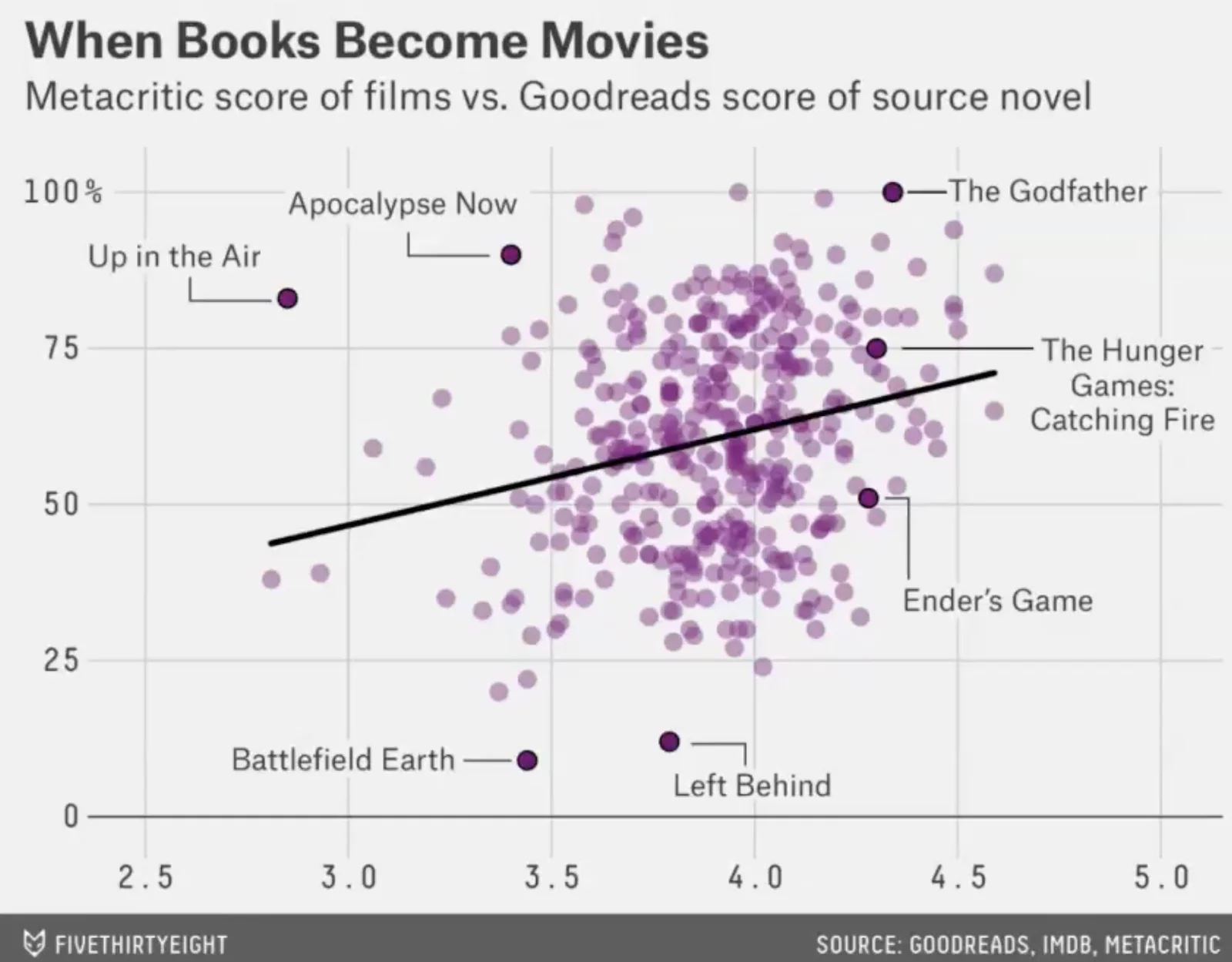
Well-designed graphics augment human intelligence by making structures visible. As an example, check Figure 1: in just a glance, you can decide whether to read the book instead of watching the movie (e.g., Ender’s Game, great book but mediocre film) or watch the film instead of reading the book (e.g., the Godfather, outstanding movie even compared to the highly-rated book). This is the power of visualization: it lets us extract useful insights almost instantly, something that would take much longer if we only had a table of scores.
2) When Visualization Misleads
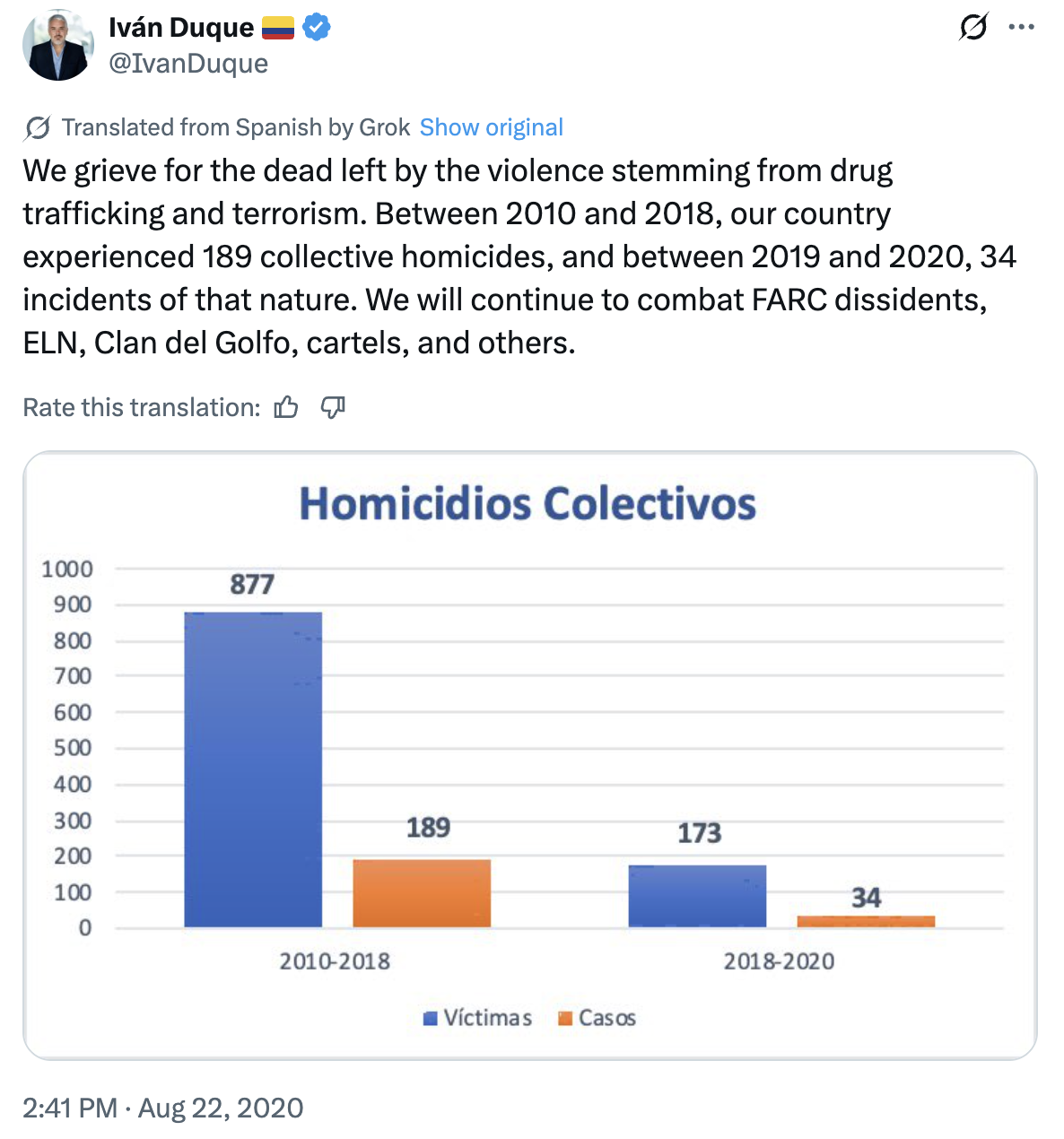
Poorly designed graphs can distort or obscure our thinking. A misplaced baseline, an inconsistent distance, or a truncated axis can radically alter perceptions. A clear example is the post shown in Figure 2, which compares collective homicides in Colombia during 2010–2018 with those in 2019–2020. Presenting deaths over two years versus over eight years without clarifying time scales makes the reduction look much larger than it really is. The same visualization techniques can also produce lies!
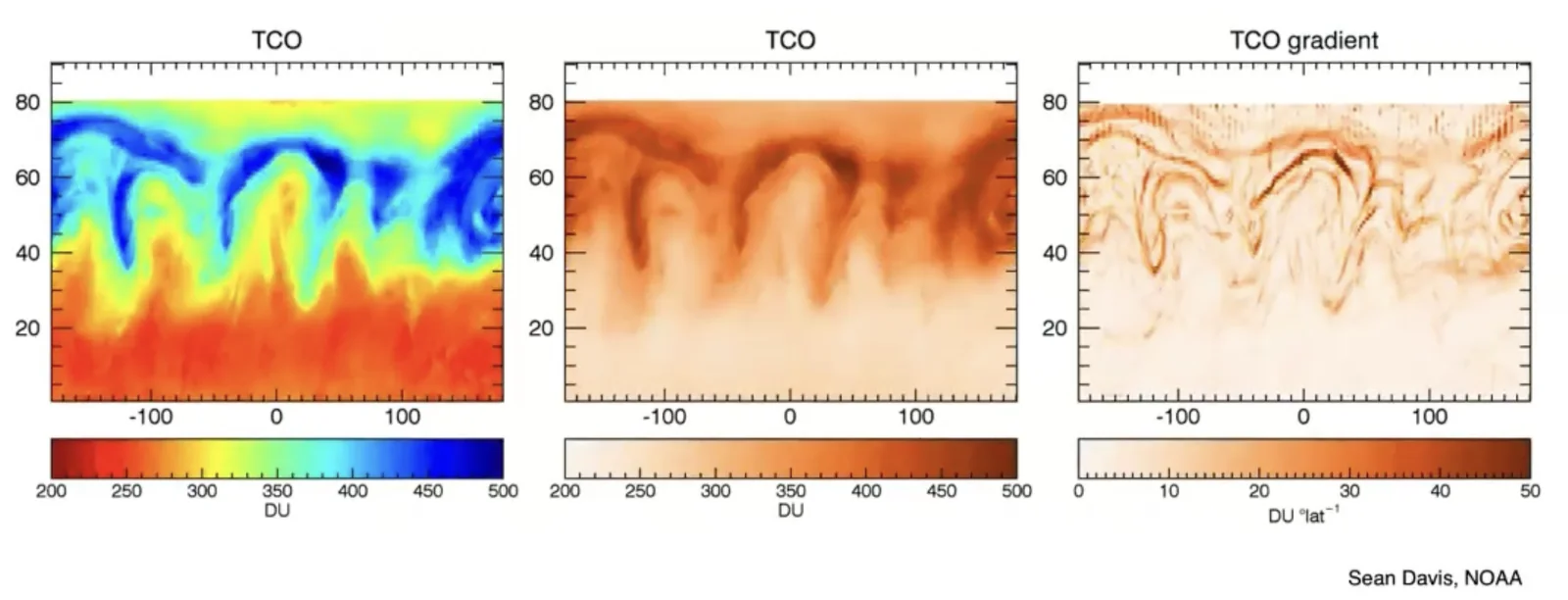
Color choices matter. In the example below (see Figure 3), the same dataset is shown with three different encodings: the rainbow palette (left), a single-hue palette (middle), and a gradient of differences (right). The rainbow palette makes it look visually striking but is perceptually misleading, while the more uniform palettes display the true underlying patterns more clearly. Here, since human vision does not perceive equal steps in hue as equal steps in value, differences in green and yellow appear much stronger than differences in red or blue. This can artificially suggest gradients or boundaries that do not actually exist in the data, distorting interpretation just as much as truncated axes or inconsistent baselines do.
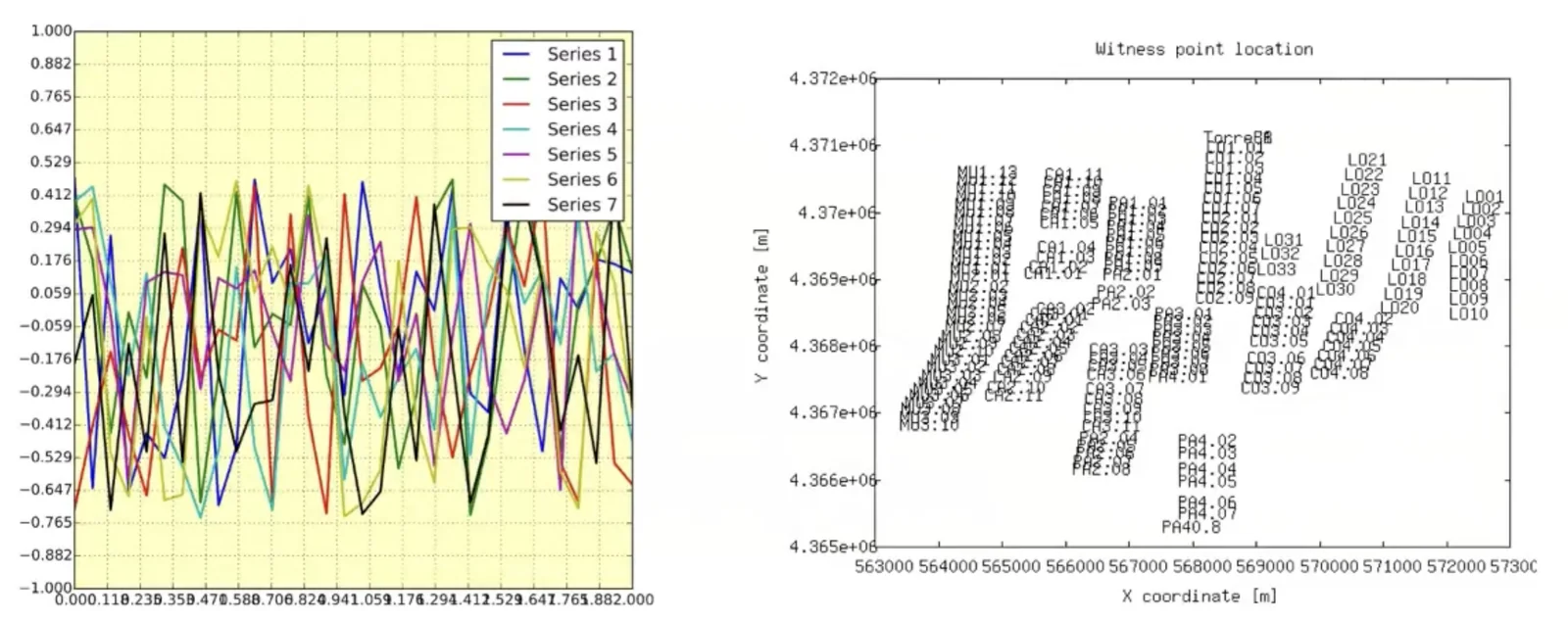
Cluttering can lose graphs the power they have. When too much information is packed into a single graph, be it too many lines, overlapping labels, or unreadable axes, the message disappears. Instead of clarifying, the figure overwhelms and confuses the viewer. The examples in Figure 4 illustrate this problem: on the left, multiple series overlap chaotically with an unreadable x-axis; on the right, labels cover each other so densely that the underlying spatial pattern cannot be seen. In both cases, the chart fails to serve its purpose. The lesson is simple: less is more. Good visualization requires prioritizing clarity over exhaustiveness.
3) Use Visualization in Our Favor
Now that we know visualization can help us think, and that it can also make us think wrong, we can better use it to our advantage. Figure 5 is an example where a graph is used to help us think easily and correctly. It shows measles cases in the United States by state and year. Each small square represents one data point, with colors reflecting incidence. The vertical black line marks the introduction of the measles vaccine.
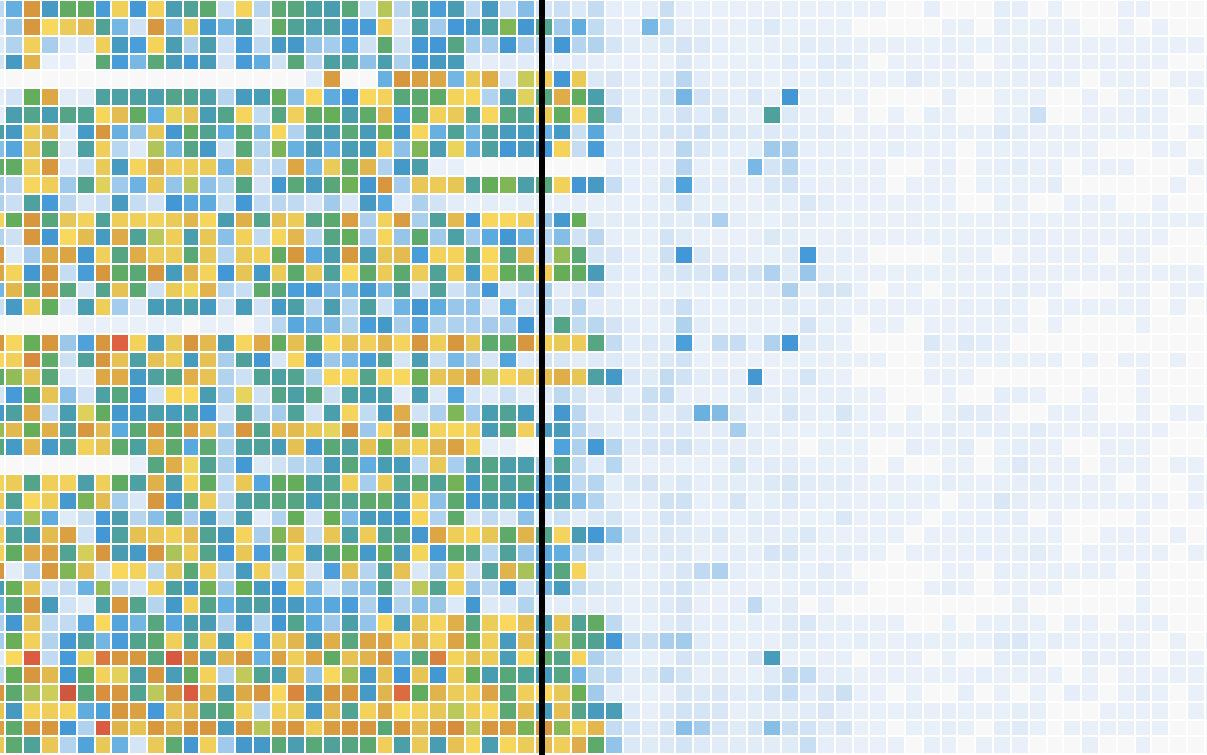
With this design, the viewer grasps at a glance what would be less clear in raw numbers: before the vaccine, measles outbreaks were widespread and frequent. After the vaccine, the disease virtually disappears. This shows the power of visualization when used properly. It helps us to:
Spot patterns and breaks (e.g., before vs. after a policy).
Summarize complexity in ways tables cannot.
Communicate persuasively to diverse audiences.
From this, the answer to why we want to visualize is clear: visualization can increase human abilities to overcome cognitive and memory limitations and help us think more clearly!
Understand Visual Encoding
We have seen that visualization can both clarify and mislead, and that a graph is an external representation that extends human cognitive capacity. Now we will further explore visual encoding. This section draws heavily on Visualization Analysis and Design by Tamara Munzner.
1) The Visualization Process
Tamara Munzner defines visualization systems as providing visual representations of datasets designed to help people carry out tasks more effectively, and models the visualization process as follows:
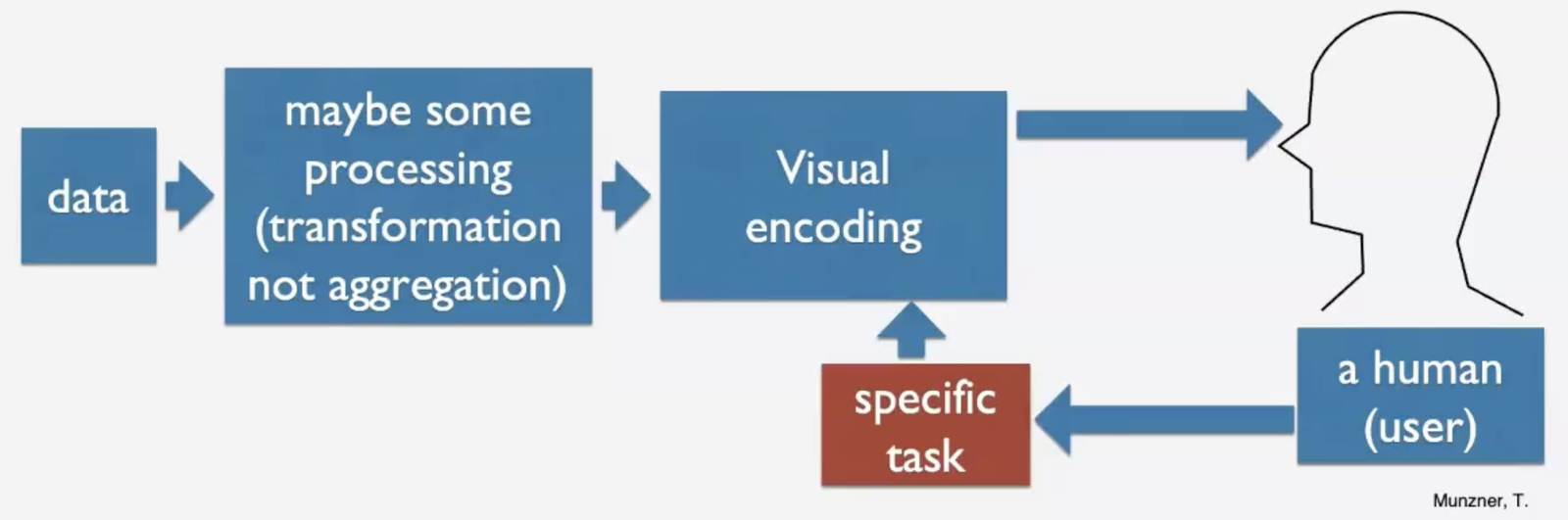
Within this framework, visual encoding sits at a critical point, representing the process of mapping data into visual information that helps us humans with specific tasks. But before discussing visual encoding, it is also important to note two other characteristics of the visualization framework:
Human in the loop: Visualization systems are most appropriate when the goal is to augment, not replace, human reasoning.
Task orientation: Visualization always serves a purpose: comparing values, detecting outliers, and identifying patterns. The design must match the task. Additionally, when we are unsure of the exact question to ask, visualization helps us explore. Algorithms cannot do this better or faster.
2) Visual Encoding: Channels, Expressiveness, and Precision
Now we turn to visual encoding. It is worth emphasizing that the graphic elements we choose matter! Figure 7 helps us understand how these elements affect the expressiveness of our visual design:
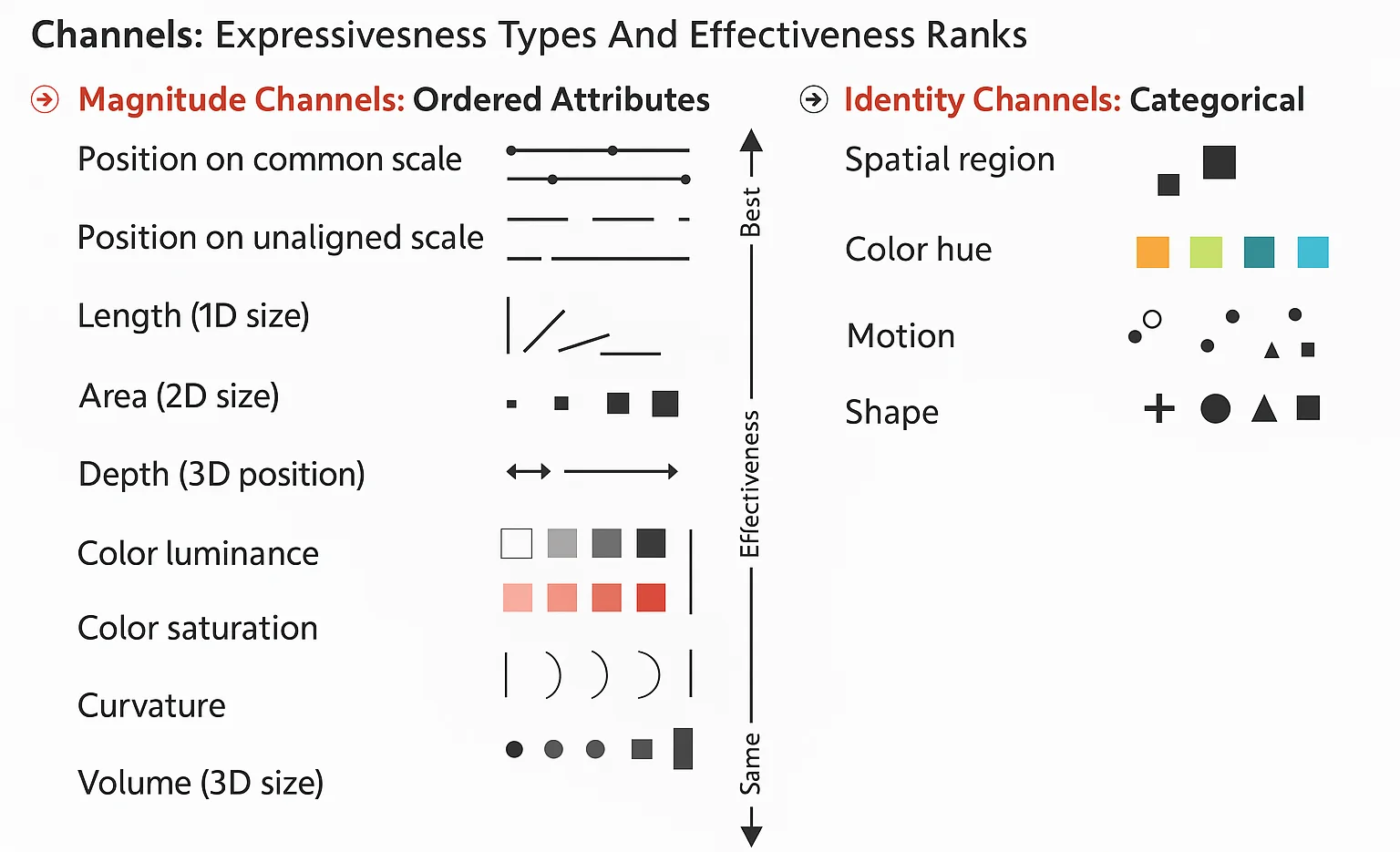
Here, visual channels are separated into magnitude and identity, and the vertical axis highlights the effectiveness of certain visual encoding:
Magnitude channels are for attributes with some inherent order, ordinal or quantitative, showing how much. These include position, length, angle, area, depth, luminance, saturation, curvature, and volume. They are ranked vertically by effectiveness in the figure, from most effective (e.g., position) at the top to least effective at the bottom (e.g., volume)
Identity channels are for categorical attributes, providing information about what. These include spatial region, color hue, motion, and shape. They do not imply order but are effective at distinguishing categories.
Psychological research confirms that not all encodings are equally precise. According to Stevens’ Power Law, our perception of magnitude is nonlinear: we may overestimate some differences and underestimate others. Experiments consistently find that people are most accurate when comparing position along a common scale, less so with length or angle, and least with area or volume.
The lesson from understanding visual encoding is straightforward: the graphics we choose matter. When visualizing our data, the chosen channel must match the data attribute: using color hues for quantitative attributes can mislead. Besides, whenever appropriate, choose the elements with higher effectiveness and metrics that human brains can perceive more precisely.
Best Practices for Academic Visual Design
Based on our understanding of visual encoding, we now know that designing effective graphics is not about aesthetic choices alone but about following principles that make information clear, precise, and interpretable. Here are some recommended practices:
Pay Attention to the Axes: Axes can radically alter how trends are perceived. Always show a complete axis for charts that encode size (e.g., bars); they must start at zero. Line charts, by contrast, encode point position, so a truncated axis may be acceptable for highlighting variation. Aspect ratios also matter. The slope can look dramatic when the axis is compressed, or negligible when stretched. You may want to use a wider ratio (to emphasize long-run trends) or a narrower one (to highlight short-term spikes). Research shows that perception is more precise at a 45° angle.
Annotate Thoughtfully: Never assume that your audience knows your data! Always provide clear axis labels, titles, legends, and color scale. Highlight key points when necessary.
Show the Data, Not Just the Statistics: Summary statistics sometimes are misleading. A famous illustration is the Anscombe’s Quartet: identical descriptive statistics, radically different data. Always check the distribution to avoid missing important structure in the data.
Bonus: Choose the Right Chart. Different graphs serve different purposes. Choose one that matches your task. Useful resources such as Visual Vocabulary guide on choosing the right chart1, while websites like viz.wtf showcase poor practices that serve as “negative inspiration”.
Main Takeaway from Part 1: Visualization is important. Moreover, the same set of underlying techniques is used to produce any visualization, independent of the fields. Whether you are showing population data, climate trends, or regression results, the visualizations can be produced and analyzed under a common framework.
Part 2. Visualization for Economists
The second part of this lecture turns the focus from general visualization principles to the specific needs of economists. In economics, we need to visualize not only our data but also our results. Graphical representations offer a clearer and more intuitive way to communicate both data and findings, thereby making research more transparent, engaging, and ultimately more impactful.
Contents of Part 2:
Data Visualization for Economists
1) The Problem and the Solution
Economists usually have an over-reliance on long descriptive statistics and regression tables, which are effective for detailed reporting. Yet, the problem is that such tables often overwhelm readers and obscure key insights. Moreover, we often write and present for other economists, neglecting broader audiences, such as policymakers or colleagues from other disciplines who may not read tables the way we do.
The solution is simple: we need to use visuals. Visuals make our research more engaging. They make seminars more enjoyable, papers more readable, and referees easier to convince. An effective figure can replace several paragraphs of text and is often the part of the presentation that people actually remember.
Graphs can distill complex data into clear, accessible insights, aiding in the communication of findings to both technical and non-technical audiences by overcoming (some) communication challenges, as the general public does understand graphs better than regression tables. One additional point: Juniors sometimes tend to put all the results without a selective focus; this should be avoided. But at the same time, remember to document everything at least in an appendix.
2) Data Visualization vs. Visualization of Results
Think about visualization as playing two different roles in the research process: data visualization and visualization of results. Both stages are equally important. Visualizing the data guides the analysis; visualizing the results communicates it. In both cases, the idea is the same: to make information visible, intuitive, and credible.
Data visualization comes first as an essential tool in economics before running any econometric analysis. It helps us understand the structure of the data, identify patterns and trends, spot outliers, detect errors, and even provides insights into relationships between variables. In the case of using complex data sets, visualization also facilitates communication of the data.
Visualization of results comes after estimation for graphically presenting our main outcomes of econometric models. Ways to translate statistical estimates into clear, interpretable visuals include regression discontinuity and bunching graphs, event study plots for difference-in-differences, marginal effects graphs, etc.
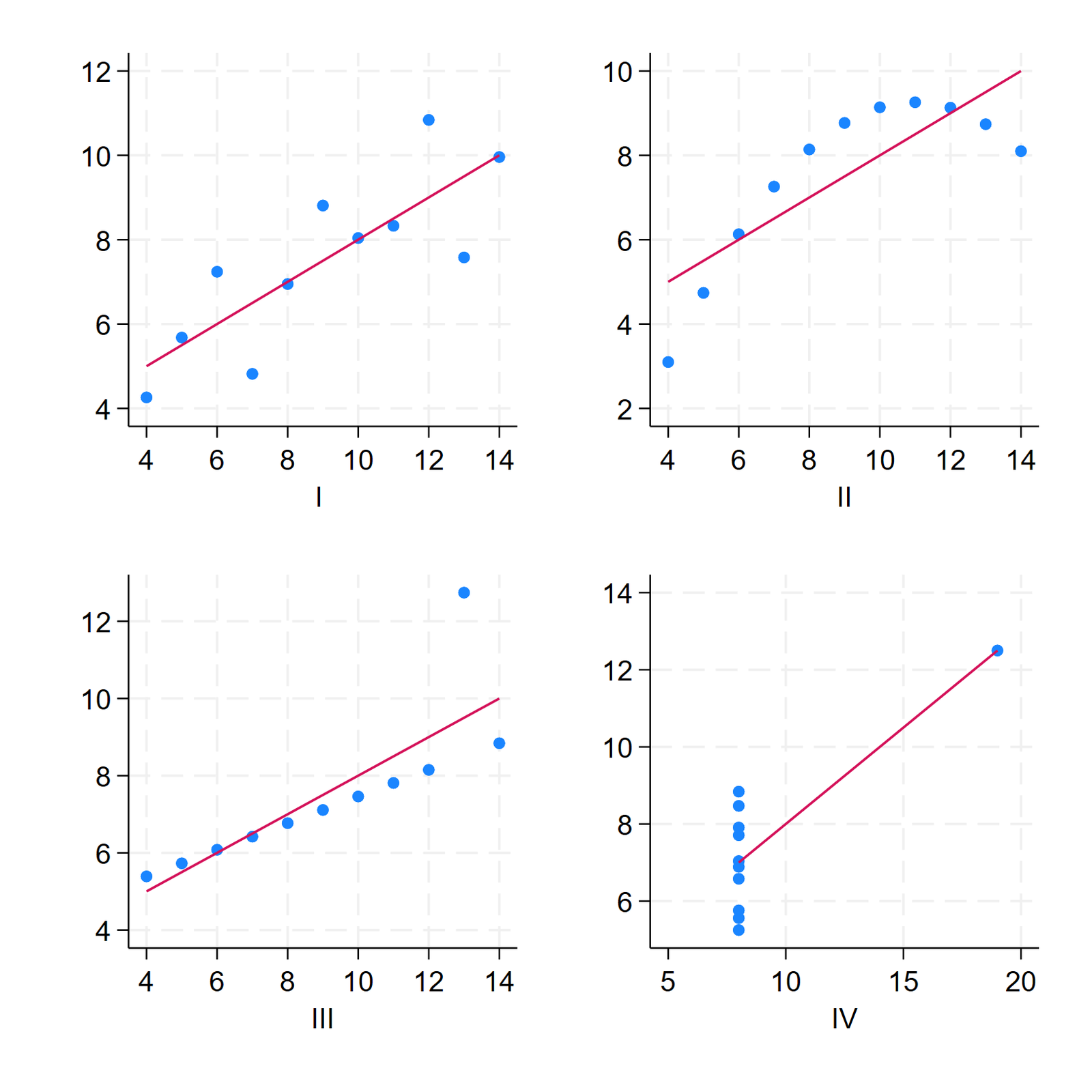
Imagine an example like the aforementioned Anscombe’s Quartet (Figure 8). Here, a regression table would clearly hide important information about the relationship between the x and y. In practice, there is no one-size-fits-all answer to the question of whether a figure or a table is better; it will depend on the specific context and purpose of the visual display. However, some general guidelines can help you decide when to use a figure instead of a table:
When showing trends or patterns over time or across variables, figures are often better for visualizing trends or patterns over time or across variables, using scatterplots, line graphs, and bar charts. Tables can also show trends, but figures can make them more visually apparent and easier to interpret.
Tables are often preferred to show alternative specifications or robustness checks.
Visualization is not a cosmetic addition to a project; it is part of the research process itself, as it helps us think and helps us communicate (and both are fundamental to doing good empirical research).
Visualize Data Before Estimating
Let’s move to something even more fundamental: how we see the data itself. Before running any regression, before estimating any model, we need to understand what our data looks like.
1) How Do We See the Data?
Our brain processes visual information in two stages: a fast, automatic one and a slower, deliberate one. The first is called pre-attentive processing. It is an unconscious, automatic processing of visual stimuli that occurs before we consciously attend to them. We instantly recognize basic features of visual perception, such as color, size, length, and orientation.
The second stage, attentive processing, is the conscious processing of visual information that occurs when we focus our attention on a particular object or stimulus in our environment. It is slower and involves more complex cognitive processes such as object recognition, memory, and decision-making.
Visualization works because it takes advantage of this first, pre-attentive system. When data are encoded visually, we can detect patterns long before we have processed the numbers. The challenge is to design graphs that exploit these abilities without overloading them.
2) What Do We Want to Visualize?
The first step of data visualization is always to ask: What type of information do I want to show? Most answers fall into one of the following four categories:
Amounts: how much of something exists.
Proportions: how a total divides into parts.
Distributions: how values are spread across observations.
Relationships or correlations: how two or more variables move together.
After figuring out the type of information to show, we will proceed with choosing visualization tools. Below are some examples of using suitable tools for each category, drawn from the speaker’s own research.
Visualizing Amounts
To show amounts, you can begin with a simple bar chart. For example, in a survey experiment on preferences for redistribution, respondents are asked whether differences between rich and poor are “not a problem”, “a small problem”, “a serious problem”, or “a very serious problem”. A bar chart immediately shows which answers are most common. Adding a second dimension —for instance, comparing treatment and control groups— can reveal meaningful contrasts clearly (see Figure 9).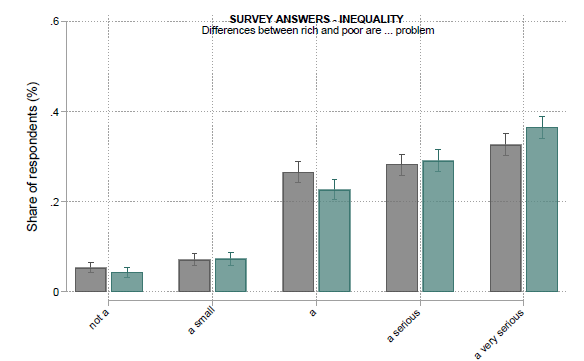
Figure 9. Example of Amounts Illustration (Foremny, 2024) Visualizing Proportions
When interested in proportions, we often need to represent several categories within one total. Stacked bars are a simple option. Figure 10 (Foremny, 2024) shows how to plot regional variation in survey responses using horizontal stacked bars —one for each Autonomous Community in Spain. This makes it easier for us to compare how the perception of inequality differs across Spain.However, with many categories within a variable, it can be difficult to illustrate the relationship between categories across variables. A further example comes from questions about identity: whether individuals feel they belong more to their nation or to their region (Foremny, 2024). Here, a Sankey chart is used to visualize how these two dimensions interact. Each flow connects regional to national identity, making it visually obvious that attachment to one often predicts attachment to the other (see Figure 11). This kind of plot helps us grasp multidimensional relationships that would be impossible to summarize in text.
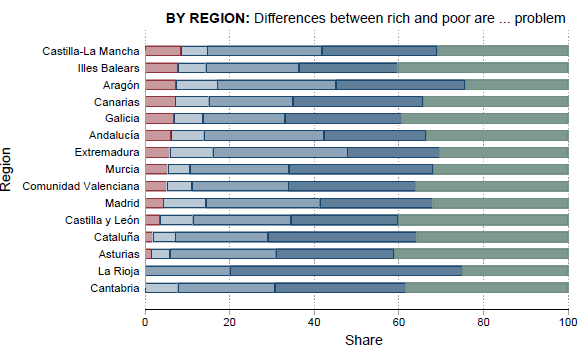
Figure 10. Example 1 of Proportions Illustration 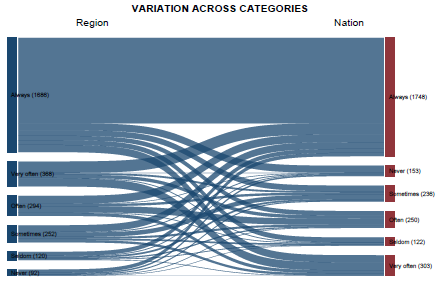
Figure 11. Example 2 of Proportions Illustration Visualizing Distributions
Histograms have been a popular visualization option for showing distributions since the 18th century. They depend on the bin width: a bin width that’s too small may obscure trends in the data; a bin width that’s too large may cause smaller features in the data to disappear. It’s important to try different bin widths to accurately reflect the underlying data, rather than relying on the default option of any package.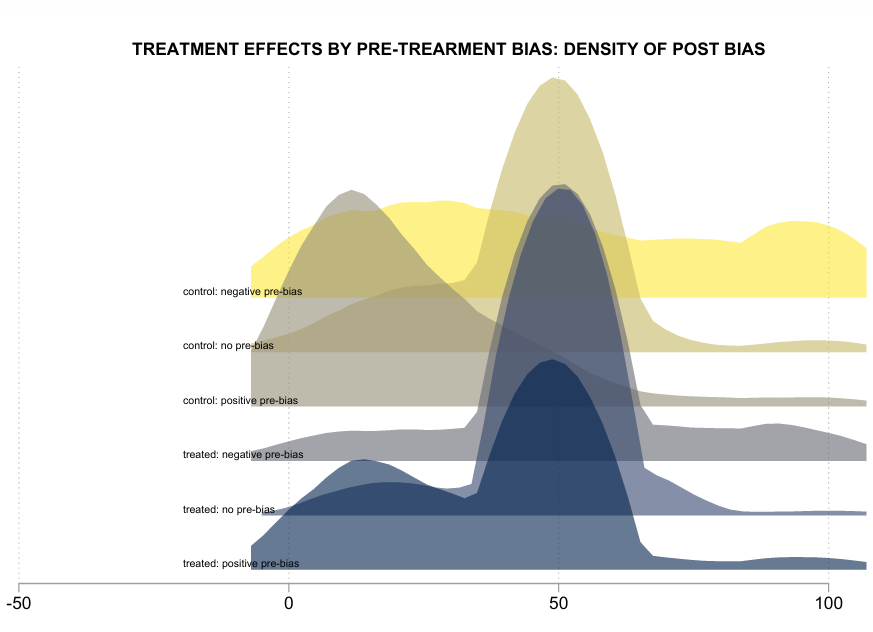
Figure 12. Density Plots Nowadays, density plots are becoming more popular due to extensive computing power. They visualize the underlying probability distribution of the data with a continuous curve. Both allow us to see how a variable spreads across its range—where the mass of the data is and whether there are outliers. The curve is estimated using kernel density estimation, with a small width and a Gaussian kernel being the most widely used. Other kernel choices are available for density plots.
In fact, with visualization, multiple distributions can be analyzed by identifying a response variable and one or more grouping variables. Here, the response variable is the variable of interest, while the grouping variables divide the data into subsets with distinct distributions of the response variable.
The example above (Figure 12) comes from an experiment where participants were asked to estimate what share of taxes is raised by the central versus the regional government, with the treatment group provided information about the tax autonomy of regional governments (the true answer being 50%) (Foremny, 2024). Plotting the distribution of the treatment effects for different groups helps show if the treatment had an effect conditional on the pre-treatment bias.
Visualizing Correlations or Relationships
To visualize the relationship between two variables, it is very useful to use scatterplots or, increasingly, binned scatterplots. The binscatter is a simple yet powerful tool: Unlike traditional scatter plots, binscatter plots group observations into bins based on the values of one of the variables. The bins are usually equally spaced intervals, and the observations within each bin are summarized using a chosen statistic, such as the mean or median.Take an example from Cattaneo et al. (2022). Figure 13 presents the usual scatter plot. Then in Figure 13, the scatterplot is binned, and, within each bin, an average is calculated. Finally, Figure 13 presents the binned scatter plot, along with a polynomial fit.
Binscatter plots are particularly useful when the relationship between variables is nonlinear or when many observations overlap in a traditional scatter plot, making it difficult to discern patterns. By grouping the observations into bins, binscatter plots can reveal patterns that might be obscured in a traditional scatter plot, especially when there is heteroscedasticity or clustering of the observations.
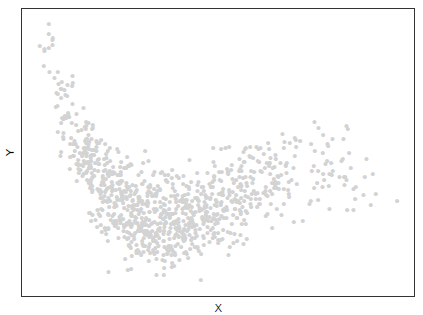
(a) A Scatterplot 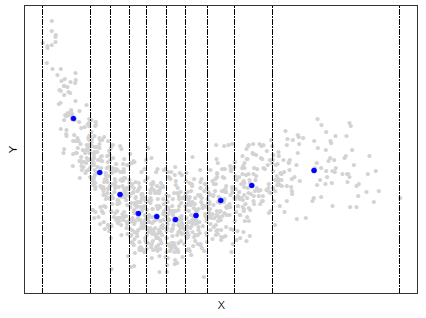
(b) Partition & Bin Means 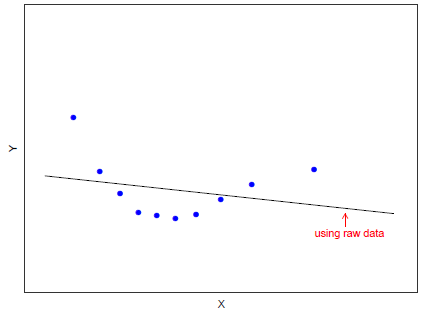
(c) Means & Polynomial Fit Figure 13. Example of Correlation Illustration
3) Some Basic Principles for Data Visualization
Keep it simple: Avoid too many colors, shapes, or design elements that distract from the data.
Label axes clearly and accurately, and Label each bar with the actual data value.
Order bars appropriately in logical order: This might be by size, alphabetical order, or chronological order.
Use appropriate scales. If the data varies widely, consider using a logarithmic scale.
Minimize clutter: Remove unnecessary gridlines or borders, and keep enough space in between bars.
Use appropriate color: Use easy-to-differentiate colors to highlight key information and differences.
Use annotations: Titles, subtitles, and footnotes, or a data source.
Visualize Econometric Results
After discussing how to visualize the data itself, let’s now turn to something that economists often overlook: how to visualize the results of our econometric models.
1) Tables and Graphs: A Balance
Historically, regression results were shown in tables. Traditionally, we have relied on tables to report dozens of coefficients, standard errors, and significance stars. Plots can make our results much more transparent, interpretable, and convincing, especially with large data sets, modern econometric tools, and larger computational power that together provide a good base for graphical visualization of econometric results.
Graphs complement, not replace, tables, in presenting results. There is a trade-off between using graphs and tables: graphs show more details, but tables allow for comparing different models and summarizing in a few parameters. Our goal is to find a balance between the two. In many cases, you can always show visuals in the main text, and report details of your estimates in tables in the appendix.
In the rest of this section, we’ll review a few visualization tools that may be the most useful in applied research: binscatter and panel data, marginal effect and marginsplot, dynamic difference in differences and coefplot, robustness checks and speccurves.
Binscatter and Panel Data
As discussed in Section Visualize Data Before Estimating, binned scatterplot, or binscatter, provides a flexible, parsimonious way of visualizing simple relationships in data based on regression techniques. For presenting results, binscatter plots are also an important tool to visualize panel-data models, as it allows us to residualize on fixed effects and controls.
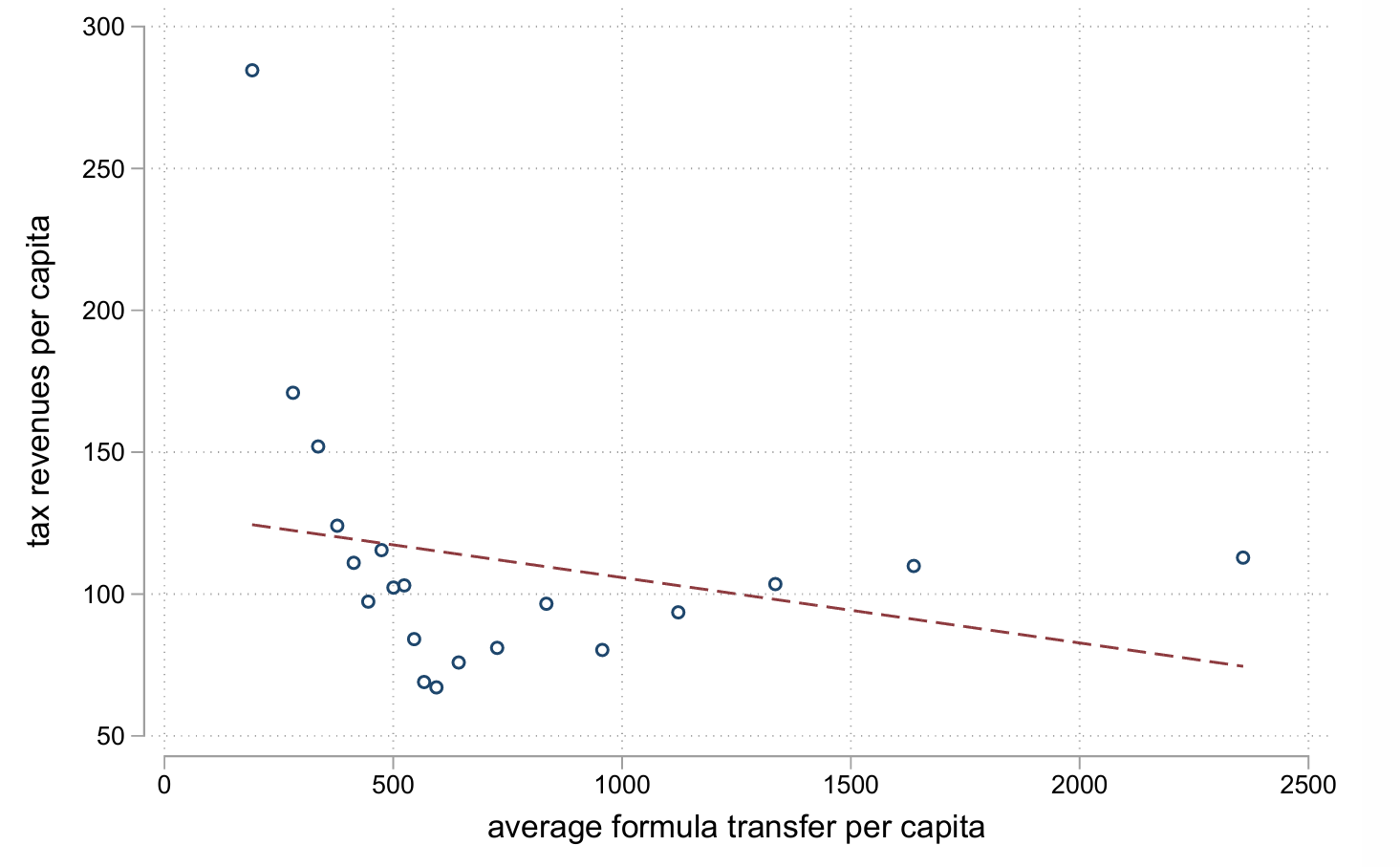
(a) Baseline Regression 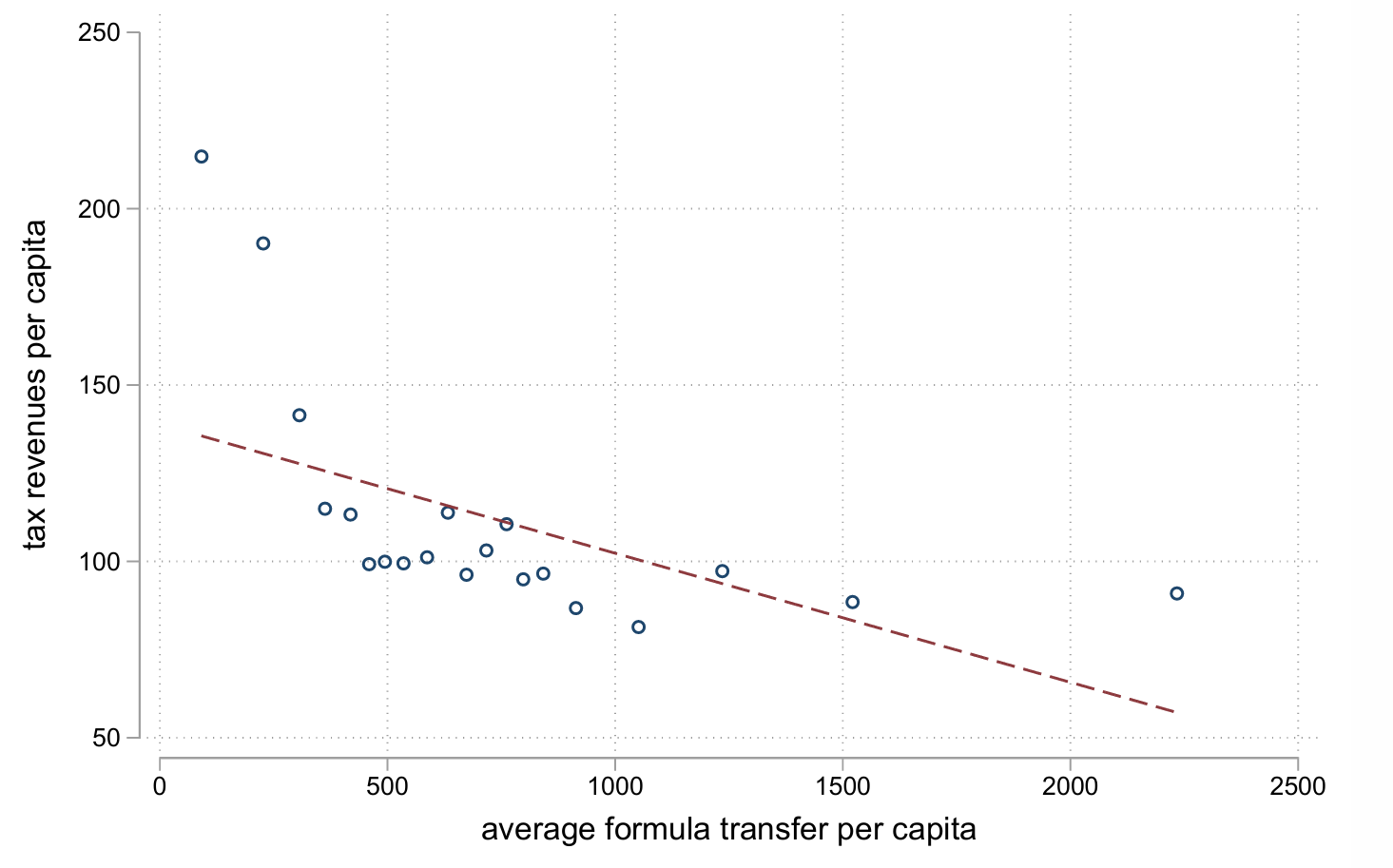
(b) With State and Time FEs 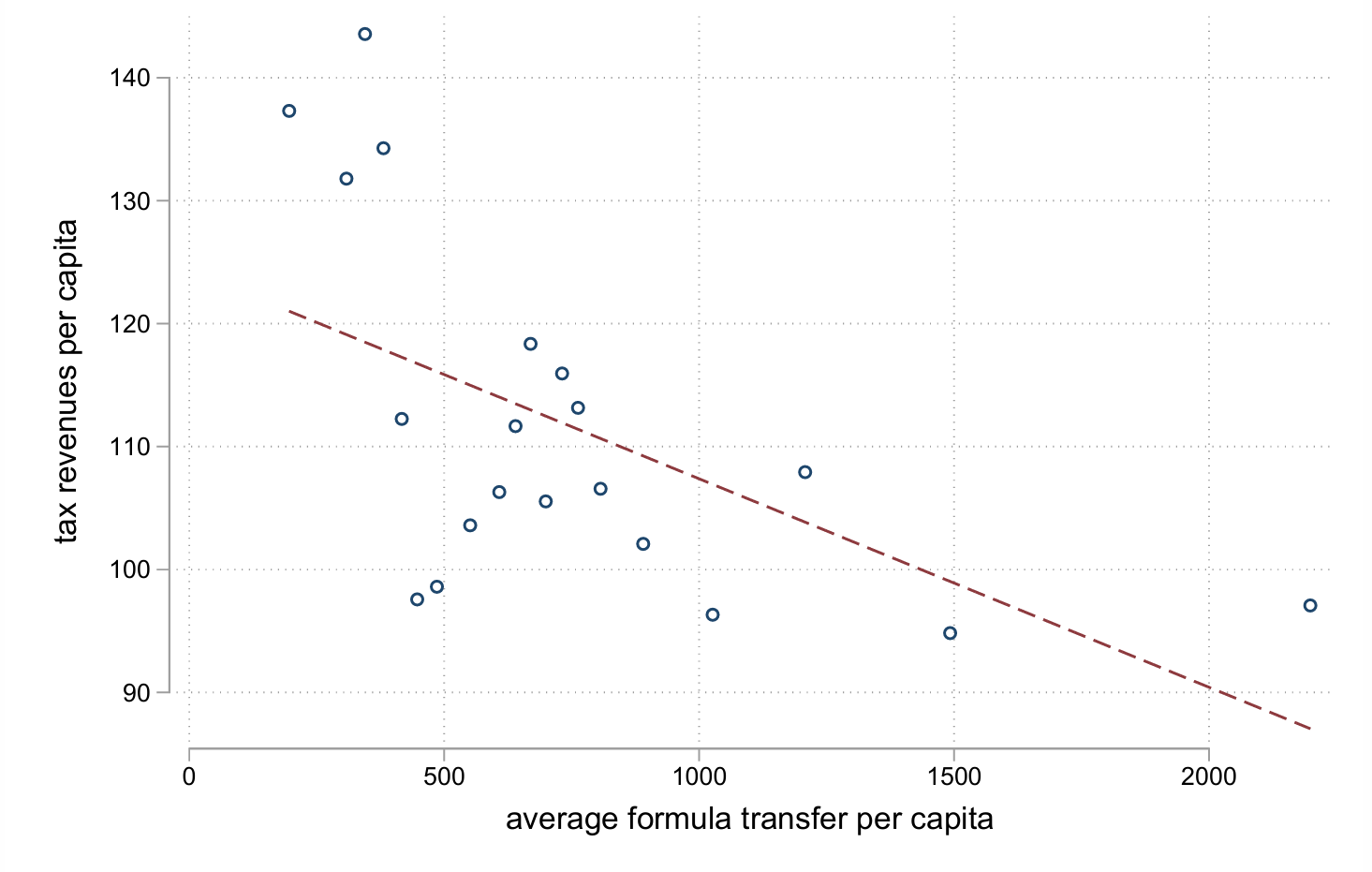
(c) Controlling for Population Figure 14. Using Binned Scatterplot for Panel Data Regressions For example, Ferraz, Foremny, and Santini (2024) study the relationship between tax revenues and transfers in Brazil. Figure 14 shows how the binned scatterplots visualize different regression results, and help the understanding of how the relationship of interest changes as the regression evolves. The first subplot 14 presents the baseline regression, where there seems to be a negative and non-linear relationship. With state and time fixed effects, the non-linearity between X and Y reduces, as in subplot 14. Finally, controlling for population resolves the non-linearity, as is shown in subplot 14.
Here are some recommended practices when using binned scatterplots:
Choose an appropriate number of bins: too few hides patterns, too many creates noise.
Overlay the raw data or jittered points for transparency.
Add fitted trends when appropriate.
Adjust for covariates: consider residualizing variables if controlling for other factors.
Label axes clearly and include units.
Keep styles and scales consistent across related graphs.
Plotting Marginal Effects
Plotting marginal effects is especially useful in nonlinear models (logit, probit) or whenever the model includes interaction terms and the effect of a variable depends on other covariates. In such cases, raw coefficients can be misleading because they represent partial derivatives evaluated at a point, and single reported coefficients alone do not capture how the effect changes across levels of interacting variables.
By plotting the predicted effect of a treatment or variable over the range of another covariate, we can see where the effect is strong, weak, or statistically insignificant. Confidence intervals provide a visual representation of uncertainty that is far more intuitive than asterisks in a table.
For instance, in Foremny (2024), the treatment dummy interacts with the perceived size of the public sector. Plotting the marginal effects of the treatment across the distribution of public-sector size reveals heterogeneity and illustrates where in the public sector size variable distribution the effects originate from (Figure 15).
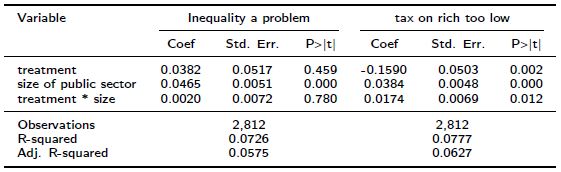
Results Table 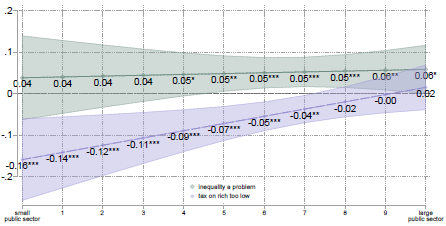
Plotting Marginal Effects Figure 15. Marginal Effects Here are some recommended practices for marginal effects plots:
Always visualize interactions or nonlinear effects.
Include confidence intervals and coefficients in the plot.
Plot over meaningful data ranges (avoid extrapolation).
Highlight non-linearities or turning points.
Label axes clearly and maintain consistent aesthetics.
Combine plots with tables when necessary.
Event Studies
Event study graphs have become the standard way of presenting dynamic difference-in-differences results. They provide more comprehensive and nuanced insights into the impact of an event, allow for the examination of the timing and duration of the effect, as well as any potential delayed or cumulative effects, and provide a test for pre-trends.
Here are some recommended practices for event study graphs:
Normalize the event time: set the treatment period to 0 (except for the staggered approach).
Show cumulative effects.
Include confidence bands for transparency.
For full transparency, include a graph (at least in the appendix) distinguishing treated vs control units, or pre- vs post-event periods.
Use interpretable scales (percentage changes, deviations from baseline).
Keep axes and styles consistent across related plots.
Specification Curve Analysis & Research Reproducibility
Finally, there is a powerful but still underused tool: the Specification Curve Analysis (SCA), proposed by Simonsohn, Simmons, and Nelson (2015). It helps address one of the main challenges in empirical research: many published studies cannot be replicated, often due to insufficient methodological details. Empirical research allows many choices in data cleaning, variable transformations, and model specification, which can influence reported effects. Small researcher decisions (e.g., excluding observations, choosing covariates) can cumulatively favor a desired narrative. Instead of presenting just one preferred specification, SCA visualizes all of them.
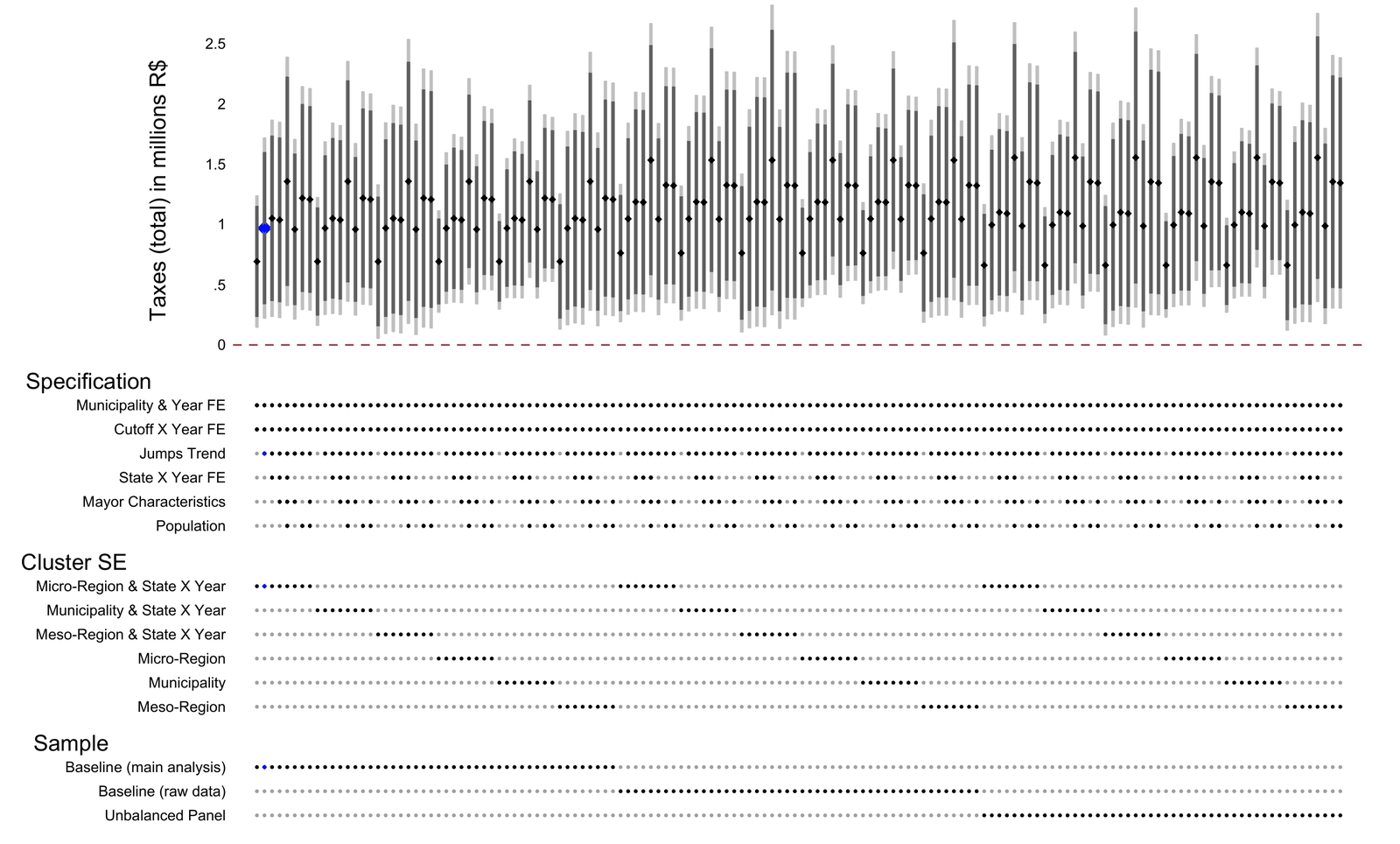
Figure 16. A Specification Curve Figure 16 shows an example from Ferraz, Foremny, and Santini (2025). In the specification curve, each model is represented by a point on the x-axis, ordered by some criterion (for example, the estimated coefficient of interest), and the y-axis shows the value of that estimate. Such a curve represents the distribution of estimated effects across a range of model specifications and provides an overall picture of the sensitivity of the results to modeling choices. Besides, if it is about including different controls and their impact, ordering by coefficient size can show which variables or sets of them shift the point estimate of the variable of interest.
The specification curve is very cool but rarely used in applied economics papers. We should use it more, as it helps with:
Robustness: By considering a range of plausible specifications, a specification curve can help identify which results are most robust and not highly dependent on a particular modeling choice.
Transparency: The curve provides a clear and concise visual representation of the sensitivity of the results to different model specifications, making it easier to communicate the findings to others.
Efficiency: The curve can help researchers to focus on the most robust and reliable results, thereby reducing the need for time-consuming and resource-intensive sensitivity analyses.
Here are some recommended practices when using specification curves:
Define a clear set of plausible specifications in advance.
Visualize all results, including those not shown in the paper.
Report deviations from the planned analysis.
Highlight influential choices and show which variables drive large changes.
Use the curve to discuss robustness, not just to display it.
Main Takeaways from Part 2: Visualizing econometric results is not an optional embellishment; it is part of rigorous empirical practice. Figures help readers clearly see the data, the logic of identification, the patterns behind coefficients, and the robustness of findings. They make our work more transparent and reproducible, and they allow audiences outside academia to understand what our research means.
Notes
Section Visualize Data Before Estimating elaborates on common charts used to explore data in economics.↩︎